Echoes of Tuneee
AI Music Generation Agent “Tunee AI” Changing AI Music Production
August 24, 2025

Repost Declaration: This article is a repost and translation of the original blog post published by Old Programmers Will on Note.com. All ownership and attribution rights of the original content belong to the original author. This translation is for reference and non-commercial use only.
いにしえ@AIクリエイター
ℹ️ This article was written entirely by hand.
Introduction
Followers of my 𝕏 account probably know that I've been testing an AI music generation tool called Tunee since early August. With the major update on 8/24, we're now approaching the much-anticipated official release.
Previously, I found and tested 「TemPolor AI 」, an AI music generation tool that was the predecessor to Tunee. While it boasted multilingual support, the Japanese vocal pronunciation was quite lacking, so I personally sent feedback about the issues and areas that needed improvement. This led to my participation in Tunee's private testing.
(I also had several creators I follow participate in TemPolor's Japanese vocal verification, thank you to everyone who participated)
I'm participating in both products as a complete volunteer out of goodwill, with no contracts or compensation. However, Tunee's exceptional usability and quality of generated music, combined with unlimited use during the testing period, has been reward enough.
Table of Contents
• Introduction
• What is Tunee AI?
• Examples of Generated Music (Videos Produced Separately)
• Starting Agent-Based AI Music Production with Tunee
• Let's Actually Create a Song!
• You Can Also Edit Lyrics for Vocal Songs
• Convenient Use of Projects
• Let's Create a Music Video (MV)!
• Let's Use Smart Mastering!
• Convenient Usage Tips Unique to AI Agents
What is Tunee AI?
It's an "agent that generates AI music for you."
(Supports multiple languages including Japanese)
🔗 Official Website
Next-Generation AI Music Agent | Tunee
As of August 24, 2025, registration is still through a waitlist, but the constraints to start using it seem to be more relaxed than before.
While Suno, Udio, and Riffusion (Producer AI) follow a workflow of inputting prompts (style) and lyrics first, then generating music, Tunee starts with a conversation with an agent. (This aspect is similar to Producer AI, the successor to Riffusion)
Examples of Generated Music (Videos Produced Separately)
Here are some songs I generated with the private beta version.
Generation Example ①: Japanese Vocal Song
Generation Example ②: Chiptune + Its Remix Version
Generation Example ③: Jazz Fusion
Generation Example ④: Aria (Opera Style)
Generation Example ⑤: Neoclassical Metal
Generation Example ⑥ -1: Bass-Featured Songs That Are Pleasant to Those Who Like Them - 1
Generation Example ⑥ -2: Bass-Featured Songs That Are Pleasant to Those Who Like Them - 2
Starting Agent-Based AI Music Production with Tunee
Screen Right After Login
Tunee perfectly responds to requests like “Quickly understand my mood and produce good AI music fast!”
Of course, you can also choose the traditional “Quick Start” mode where you input prompts.
Whether you are someone who “knows nothing about AI music but wants to create good songs through conversation” or someone who wants to “set detailed prompts and lyrics to generate,” Tunee can accommodate both. In addition to music generation, it offers a full suite of practical features:
• Smart mastering
• Stem separation
• Short MV generation up to 1 minute
• Song generation inspired by uploaded images or videos
• Re-generation with the same musical style after modifying lyrics and prompts
It's particularly recommended for a wide range of users from AI music beginners to intermediate level.
The official FAQ explicitly states that Tunee is designed with beginners in mind.
(While it's beginner-friendly, it generates quite high-quality music ☺️)
Let's Actually Create a Song!
You don't need to think of prompts from the start.
You can begin by roughly telling the agent about the atmosphere or genre of the song you want to create or listen to.
Here, I'll start with the conversation:
"I want to listen to refreshing, upbeat rock fusion that blows away the hot summer!"
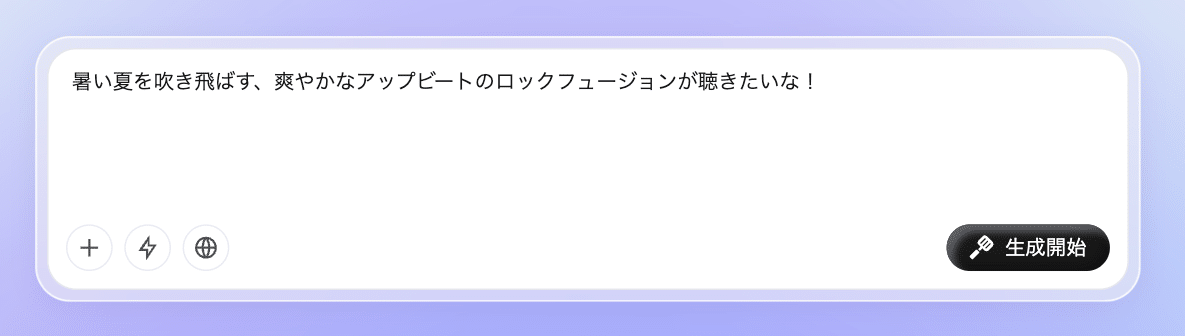
You don't need to obsess over prompts. No GPTs, Artifacts, or GEMs needed
Just go with your mood!
This starts a conversation with Tunee's AI agent.
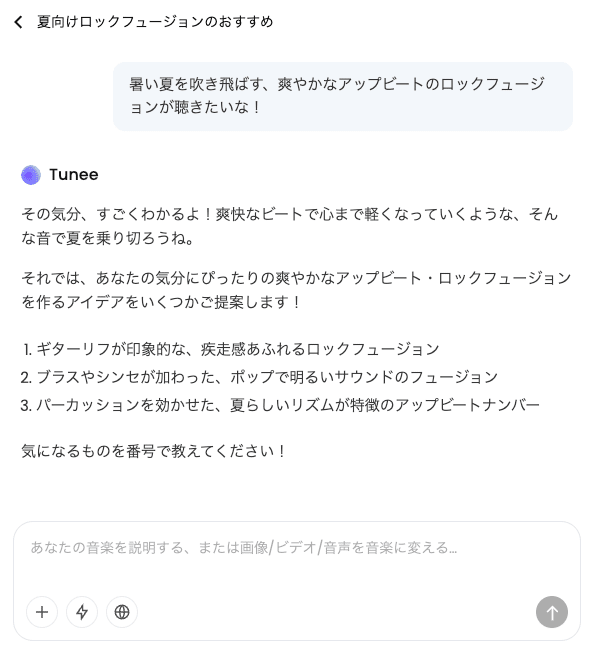
It really understands this mood
It first presents three options based on the conversation, so you select by number. Of course, you can also continue the conversation here. The flexibility is high.
I liked option "1" so I quickly communicated the number, and song generation began.
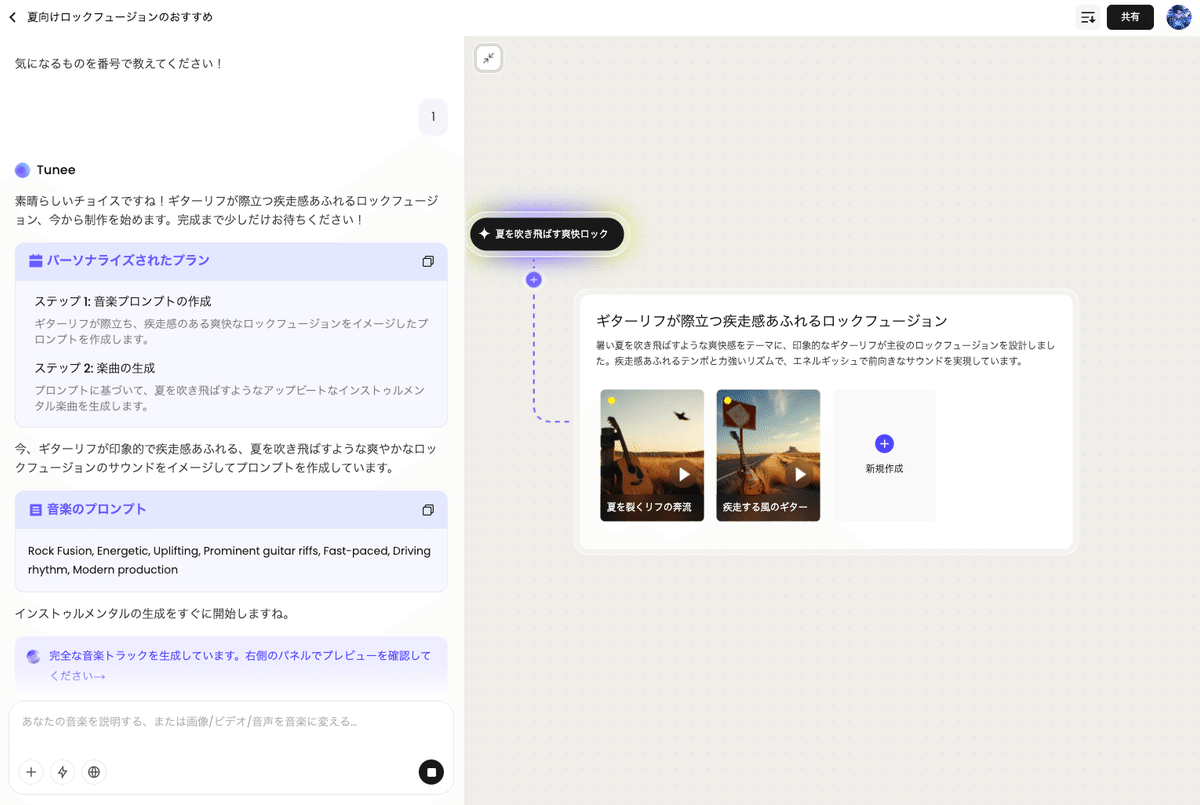
If "Vibe Coding" is popular in the AI programming world recently,
then Tunee enables "Vibe Compose" for AI music production ☺️
Conversations with Tunee happen on the left side of the screen, while generated songs are stocked on the right side.
Here's the generated song: "Refreshing, upbeat rock fusion that blows away the hot summer".
When you start from a conversation, a 'Project' is created for generating songs based on that conversation.
You can also create new projects separately.
You can create any number of projects, and each project can contain multiple songs generated from conversations.
(※ Projects are like albums where you can continuously create and store similar songs)
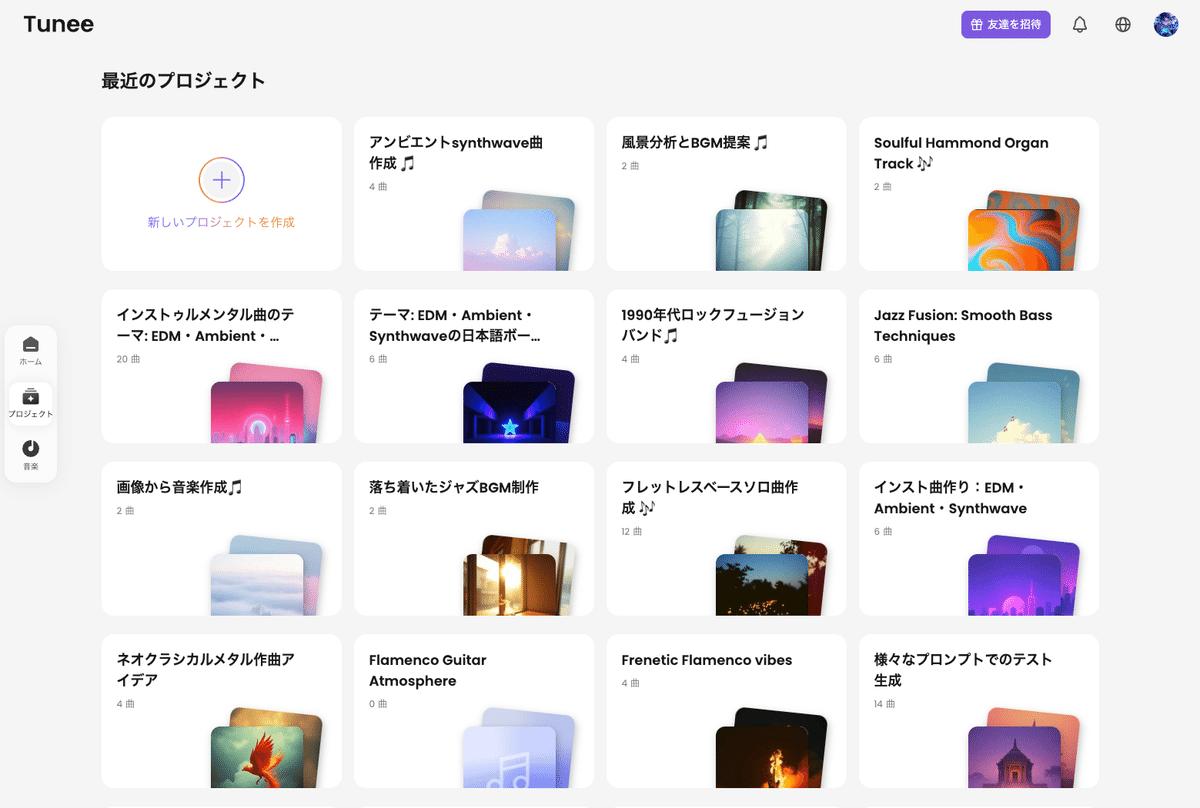
In Suno, "Workspace" serves a similar management function
Generated songs can be shared individually, and interestingly, there's a feature to share entire projects via URL.
This could be useful for team or group collaborative song creation.
Clicking the 'All Music' icon in the top right displays a list of all songs generated within the project, from which you can also download.
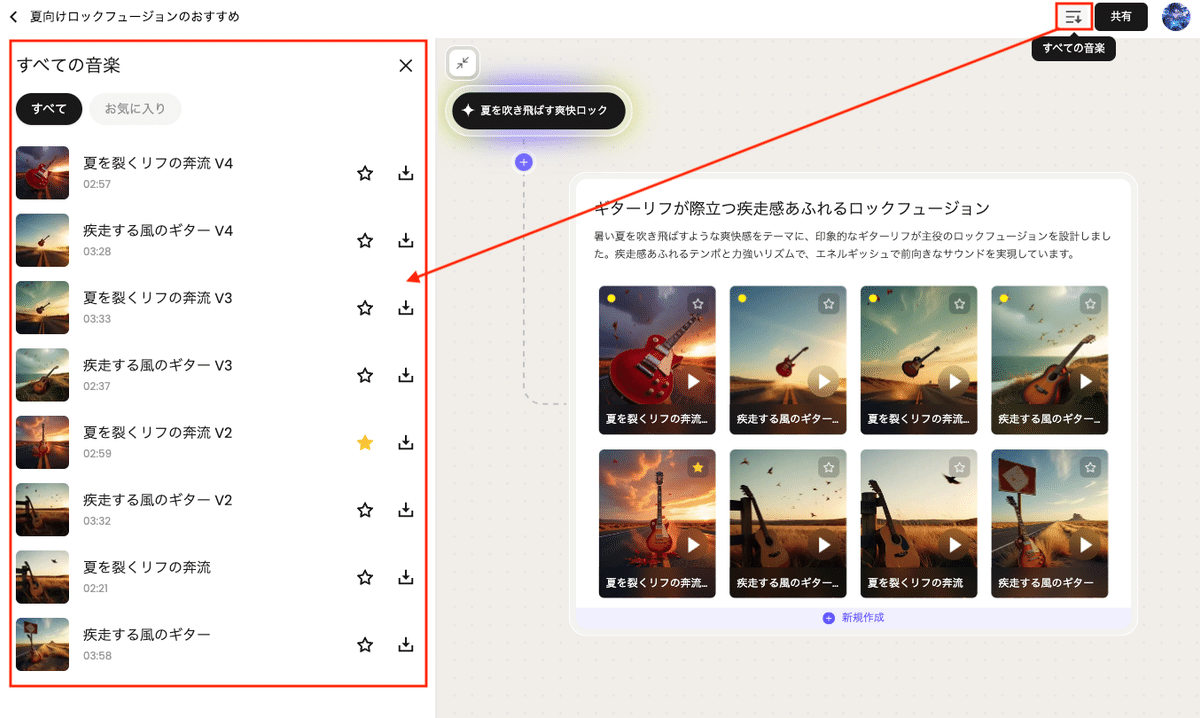
Simple but surprisingly convenient feature
You Can Also Edit Lyrics for Vocal Songs
Songs are sometimes generated with incorrect lyric pronunciation, but Tunee allows you to fix this (Suno also supports this).
In my personal usage, lyric correction and re-generation works quite well at a practical level.
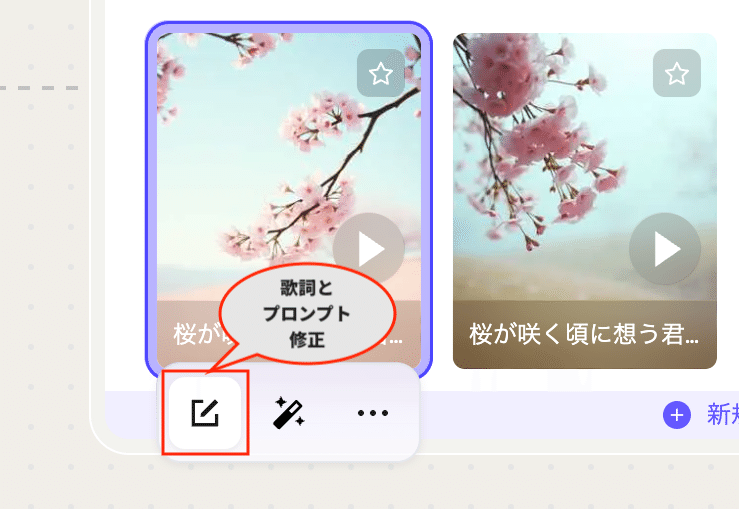
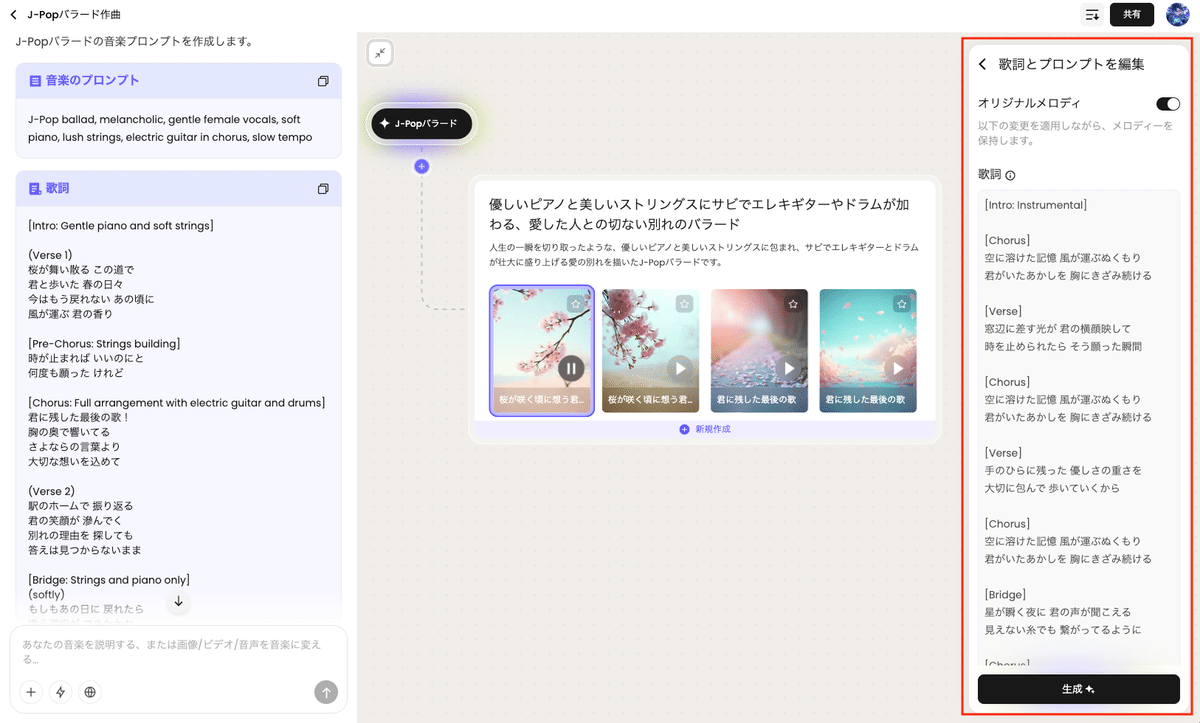
You can work from the icon below the generated song that allows you to modify lyrics and prompts.
If you want to maintain the melody, turn ON "Original Melody."
After modifying the lyrics, just press the "Generate" button.
Note that it won't be 100% identical to the original song, and the arrangement may be slightly modified, but it re-generates almost the same song with corrected lyrics.
Convenient Use of Projects
The ability to mass-produce songs of similar genres. Especially for instrumental songs, there are virtually no rejected songs (in my personal experience), making it suitable for creating full albums of the same genre in a short time.
For example, I generated a full album of Synthwave EDM - 1 hour, 17 tracks - and published it on YouTube.
🔗 YouTube Video: https://youtu.be/yrAoYdT1Ymg
The creation method was simply telling the agent:
"Instrumental songs themed around EDM, Ambient, and Synthwave"
Then just lightly checking the generated songs and repeatedly creating "new songs."
The video uses slideshow format with Midjourney-generated images for each song, but I finished it as an MV by adding Filmora's audio spectrum effects and light grain noise to the footage.
While it took half a day of work including proper crossfades between songs and song title displays, if you cut corners with song generation + single image throughout + no crossfades, you could create long-form MV-style videos in extremely short time.
Let's Create a Music Video (MV)!
Tunee's major differentiating feature from other music generation AIs is the ability to directly turn generated songs into short MVs up to 1 minute long.
Here are examples of MVs created directly from generated songs using Tunee:
As stated in the official FAQ, it uses an ambitious configuration that adopts MidJourney V7 for image generation and integrates video generation AIs like Kling V2.1 and Dreamina V3.
While credit consumption is high due to video generation, the benefit of being able to handle everything from music generation to MV creation within the platform is significant.
Let's actually create an MV from a generated song.
Select "Create MV" from the icons below the song, and the agent will start making proposals for MV creation.
User operations are just three points:
1️⃣ Decide the aspect ratio - vertical or horizontal (default is vertical)
2️⃣ Set the time range within the song for MV creation (up to 1 minute)
3️⃣ Choose the visual style
The aspect ratio selection tends to scroll out of view, so be careful if you want to create an MV in horizontal format.
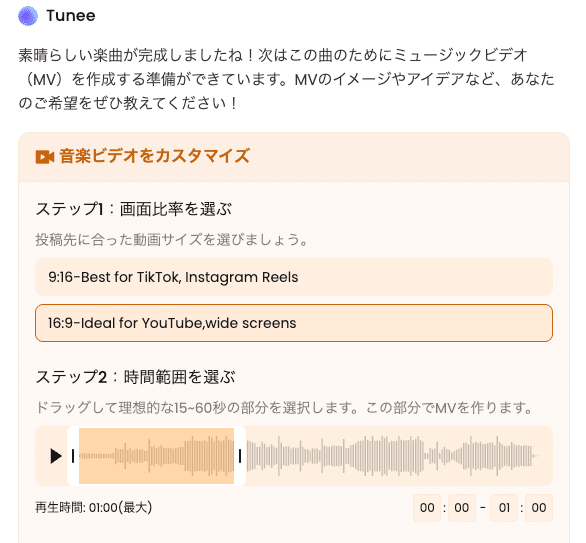
Don't forget this setting
Also, since credit consumption is quite high, it's good to set the time range shorter for the first few times to test what MV creation is like.
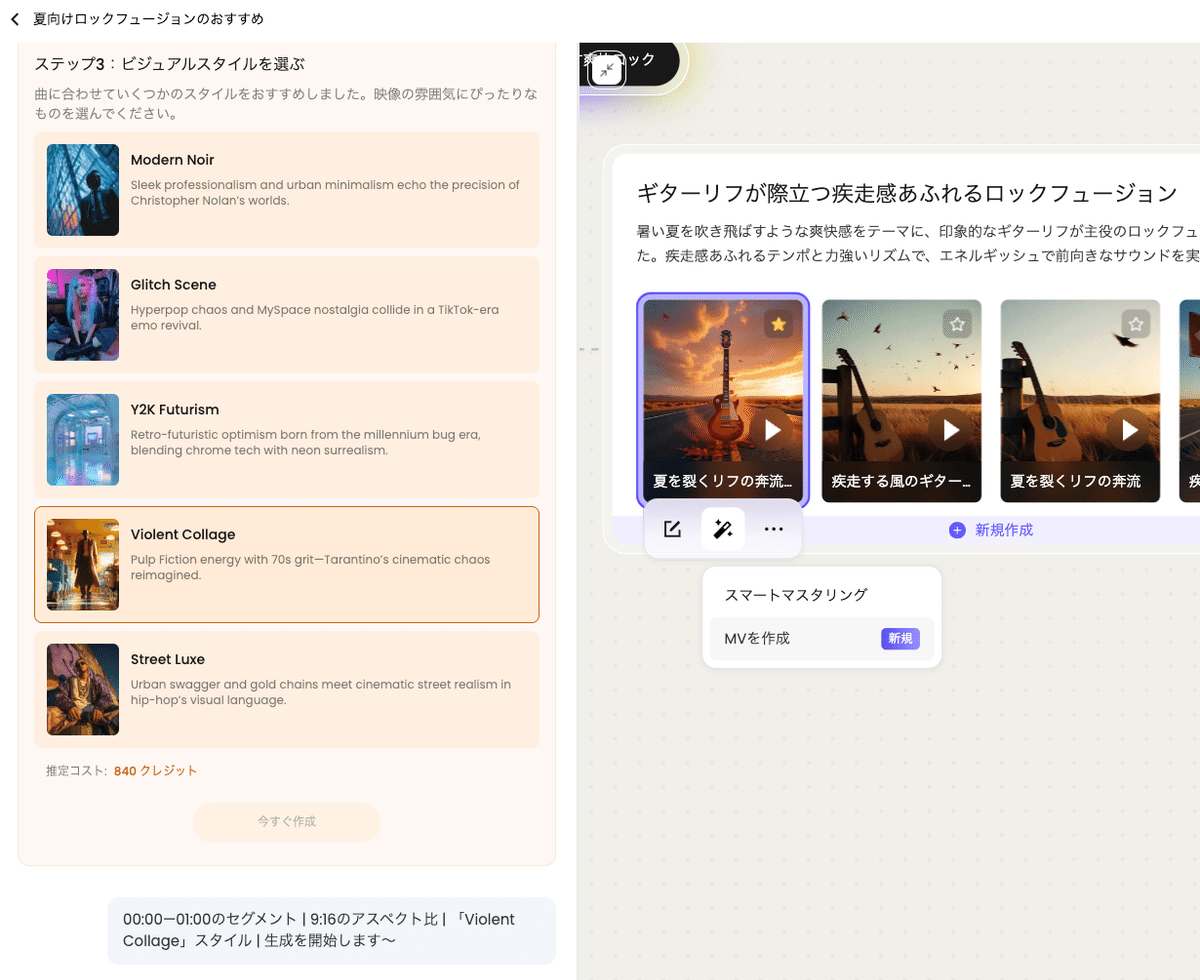
Five visual style options are presented, so choose one.
Then the agent begins MV creation work, so wait for completion.
It performs duration allocation design and storyboard creation...
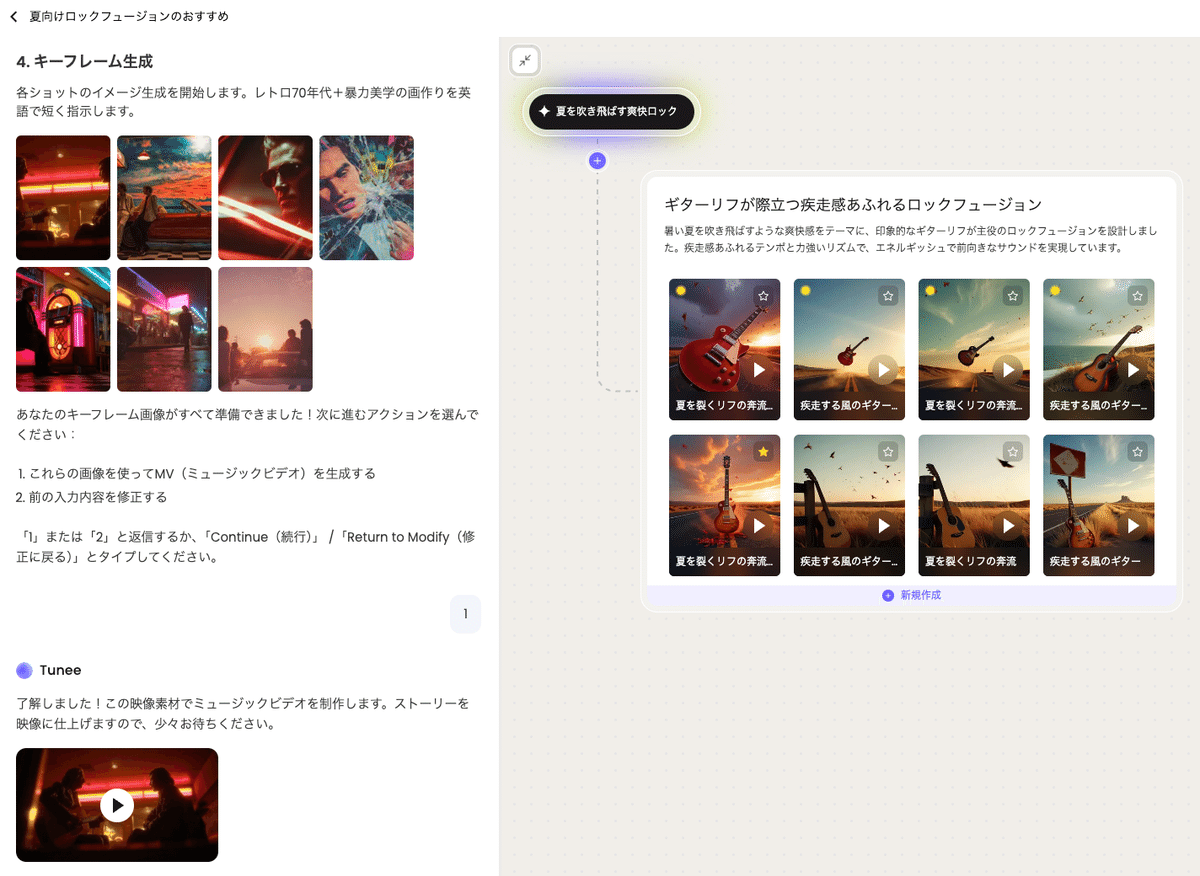
Once keyframe creation is finished, it asks for confirmation whether to proceed with MV creation. You can make modifications through conversation with the agent, but let's go ahead and create it.
Here's the created MV: Generation Example
The music properly has fade-in and fade-out processing applied.
Let's Use Smart Mastering!
Tunee includes mastering functionality for generated music.
You can use it by selecting "Smart Mastering" from the icons below the generated song.
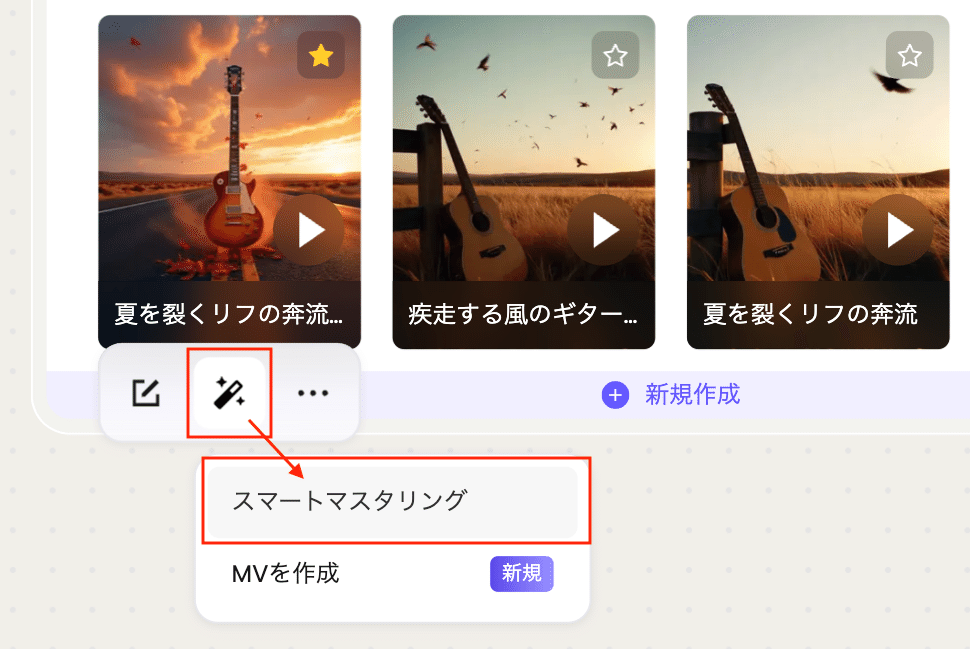
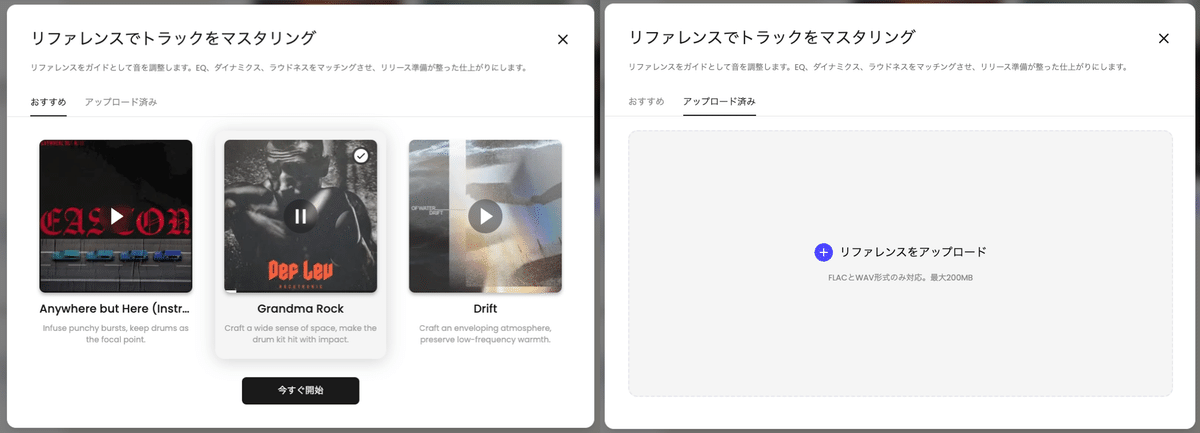
You can choose from three mastering options or upload a reference track for reference.
(※ Be mindful of copyright when uploading references)
According to direct confirmation with Tunee's official team, currently over 40 mastering options are actually available, but internally over 100 candidates are prepared and being considered for future availability, so it's promising!
The Tunee-produced EDM 1-hour full album I introduced earlier has this smart mastering applied to all tracks.
🔗 YouTube Video: https://www.youtube.com/embed/yrAoYdT1Ymg?rel=0
Convenient Usage Tips Unique to AI Agents
Since it's an agent, you can have various interactions during song generation. But everyone, how do you handle song titles for tracks generated with Suno or Udio?
You probably use separate chat-based generative AI with prompts for song title generation, right?
(That's what I was doing... I built GPTs to generate song titles and YouTube descriptions)
Tunee allows you to integrate these tasks into the production workflow.
When generating the above full album, I also had the agent create song titles within the project.
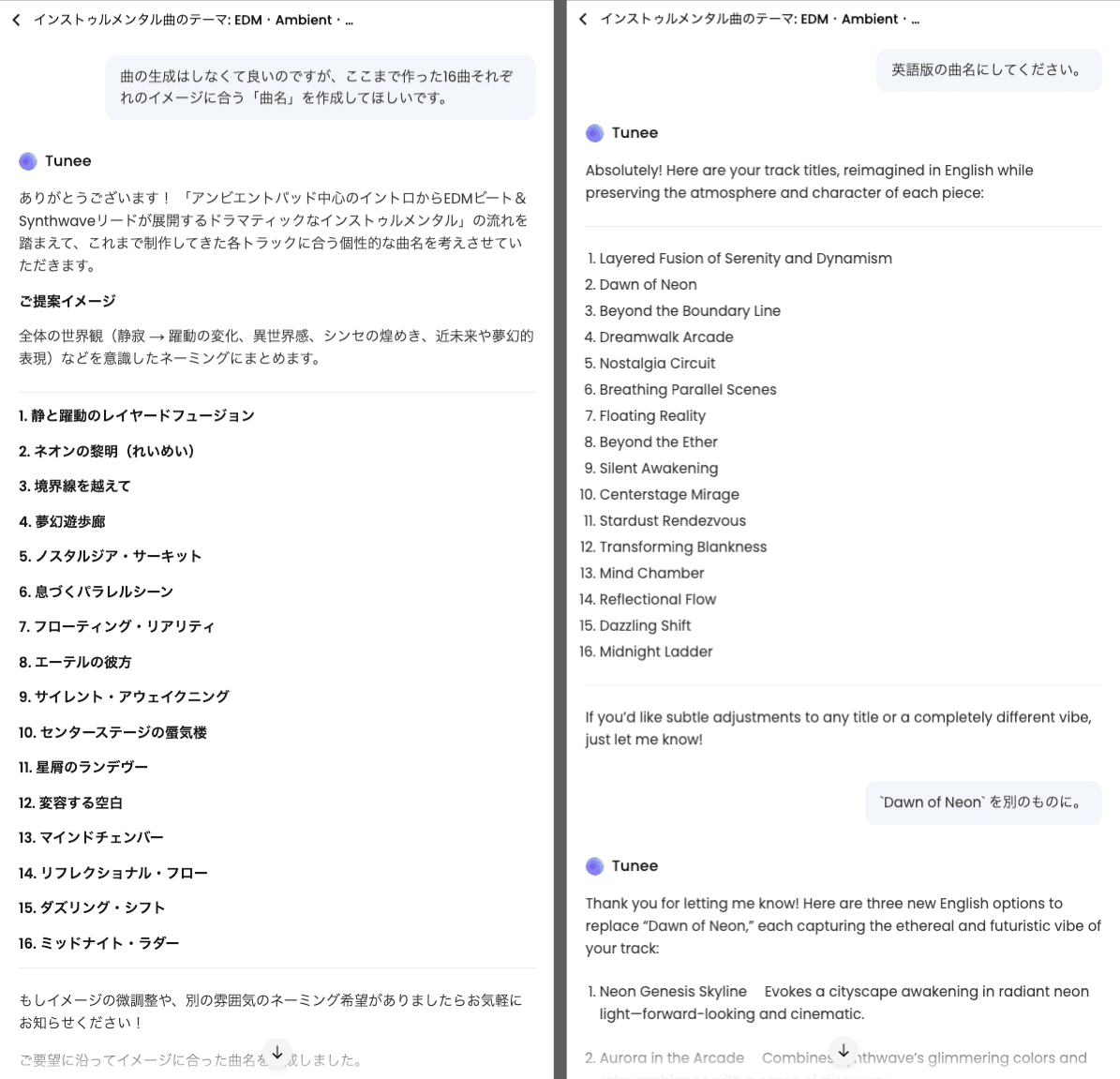
It initially proposed in Japanese, so I then had it convert to English song titles
Regarding the LLM-based chat functionality that comprises Tunee's agent, it uses Claude 4 and Qwen 3 models fine-tuned for music scenarios, making conversations quite comfortable and practical.
Since you can communicate various requests to the agent while song generation begins, it truly serves as a convenient "music production partner".
Tips for Working with Tunee's Agent
Basically, it's an AI agent that tries hard to realize whatever requests you communicate, but the conversation model, music generation model, and image/video generation models are independent.
While the conversation may work perfectly, requests communicated may not necessarily be reflected in the music or video generation results.
As is generally true for content-generating AI, "it's basically gacha" - it's recommended to use it with a mindset of accepting what you need to accept.
If you get too obsessed, you might just waste credits unnecessarily.
Pricing and Commercial Use
First, check the copyright-related clauses in the FAQ and "Terms of Service."
🔗 Terms of Service | Tunee
Read the terms of service for your relationship with Tunee. Understand the guidelines for AI music agents for your musical journey.
When using songs and MVs generated with Tunee for monetization purposes, you need to subscribe to a paid plan, just like other music generation AIs.
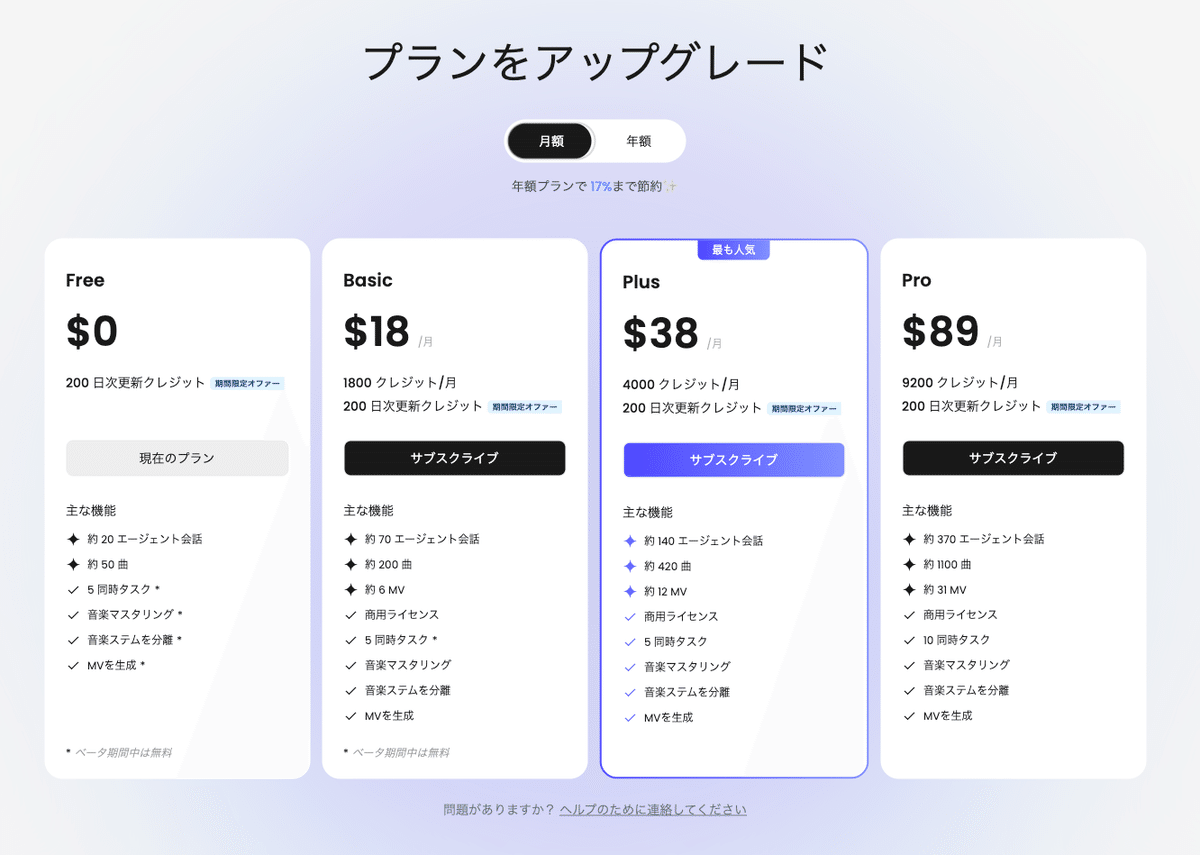
On this point, members participating as beta testers have received permission to handle generated songs relatively freely under certain constraints during the testing period in exchange for providing feedback.
About the Adopted AI Generation Models
The FAQ lists and discloses the adopted models comprehensively.
Regarding music generation models, they use both the original model "TemPolor" and "Suno", which makes me curious about how Suno is being used.
I've reached out to the official side for clarification on this point, but when I personally confirmed previously, I received the response that it's "their own development."
Given that they have their own original model and have disclosed information about it, it's not the common type that uses Suno's unofficial API, and I speculate they might be adopting Suno's open-source music generation model "Bark".
I'll update this section when new information arrives.
Conclusion
So I've introduced Tunee in some detail, considering my involvement as a tester.
While I didn't cover stem separation this time, from my brief testing, stem separation is available as a basic feature.
More importantly, reaching a practical level as an agent-based music generation AI, along with Producer AI, seems likely to influence the entire future of music generation AI.
The user interface also supports Japanese, so "those who want to use Suno but find it difficult due to many settings required for elaborate music production" should definitely try Tunee.
MEHR ENTDECKEN

柠小檬Max
Customer Stories
From HR to Bilibili Music Sensation: How Tunee Helped Me Create a Top 10 Hit Song
November 8, 2025

Rivi Nyx
Customer Stories
How Rivi Nyx, an Independent Disability Artist, Finds a Creative Partner in Tunee
September 8, 2025

Will Oldgram
Echoes of Tuneee
AI Music Generation Agent “Tunee AI” Changing AI Music Production
August 24, 2025
ERKUNDE DIE ANWENDUNGSFÄLLE VON TUNEE
Turn Your Mood Into a Song
Share your mood, and Tunee creates a catchy song with melody and lyrics.
Imitation Music Creation
Tunee generates a song in the same style as the provided reference, with vocals, maintaining the original style.
Reimagine Your Song
Keep the essence of your original song—Tunee reshapes your song into a fresh new version.
Electro-R&B Pop
Tunee creates a pop song blending electronic and R&B styles, with vocals in English and Japanese.